1.5 TB of VRAM on a Desk: How to Turn Mac Studios into a Supercomputer

Jeff Geerling is at it again. He’s building clusters, but this time it’s different.
Apple sent him a loaner package that most nerds only dream of: four fully-loaded Mac Studios with M3 Ultra chips. His goal? To see if he could smash them together to create one giant brain for AI.
The answer is yes. But it comes with a $40,000 price tag and a few headaches.
The Hardware: When Thunderbolt 5 Replaces the Server Room
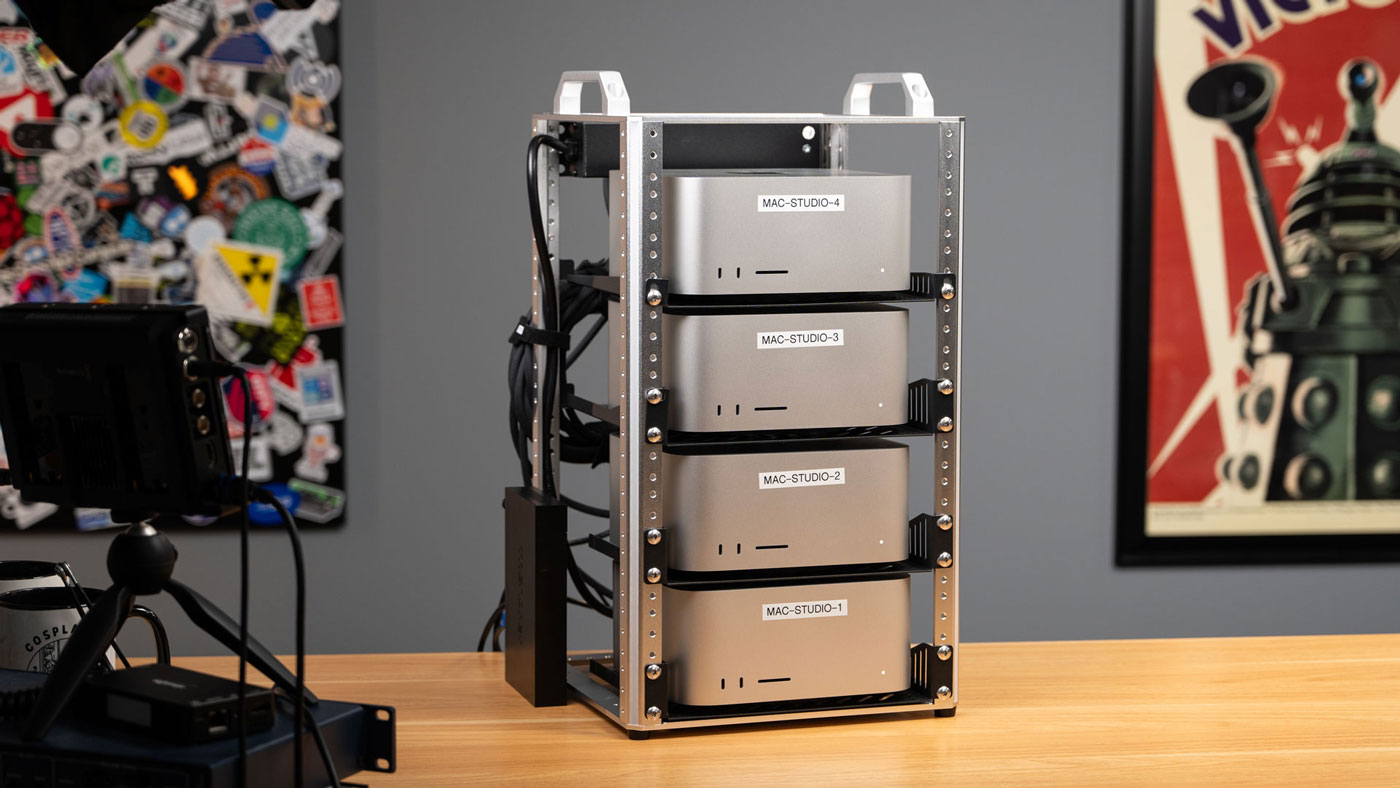
Imagine a futuristic toaster sitting on your desk. That’s the DeskPi rack Jeff used to stack these four machines.
Here is what the "Stack of Macs" looks like:

The specs are wild. The bottom two units are absolute beasts with 512 GB of memory each. The top two are slightly more "modest" at 256 GB each. When you add it all up, you get 1.5 Terabytes of unified memory.
Why does this matter? Usually, if you want to cluster computers, you need expensive network cards and loud, power-hungry switches. Here, Jeff used Thunderbolt 5.
It’s a new standard. It’s incredibly fast—up to 120 Gbps. It turns a simple external cable into a data superhighway.
But there’s a catch.
There are no Thunderbolt 5 switches in existence yet. You can’t just plug them all into a central hub. You have to daisy-chain them or cross-connect them. Every Mac has to be plugged into every other Mac.
The result? A "spiderweb" of cabling that looks messy, but gets the job done:
RDMA: The Secret Sauce of Speed
The real star of the show isn't the Mac itself, but a technology called RDMA (Remote Direct Memory Access).
Let's break it down simply. normally, when Computer A sends data to Computer B, it goes through a "TSA Checkpoint." The processor checks it, the Operating System stamps it, and then it finally goes to the network. It’s safe, but it’s slow.
RDMA is a VIP pass.
With RDMA, one Mac can reach directly into the memory of another Mac, completely bypassing the CPU and the OS. Jeff found that this reduced latency (lag) from 300 microseconds down to less than 50.
If you are training a massive AI model, that difference is everything.
But Apple didn't make this easy. There’s no "Enable Supercomputer" button in the settings. You have to boot into Recovery Mode, open a terminal, and type rdma_ctl enable. It feels like hacking, not just changing a setting.
Why Do You Need This Much RAM?
NVIDIA dominates the AI world, but their chips (like the H100) have a limit: VRAM. You usually get 80GB or maybe 128GB per card.
But modern AI models are getting fat.
Jeff ran a model called Kimi K2 Thinking. It’s over 600 GB in size. There is no single consumer graphics card on Earth that can run it. It won’t fit.
But the Mac stack swallowed it whole.
Using software called Exo, which supports this new RDMA tech, the cluster was able to generate about 30 tokens (words) per second. That is fast enough to chat with a super-intelligent AI in real-time.
Here is how the performance scales when you add more nodes using RDMA versus the old way:

Without RDMA (the blue line), adding more computers actually made things slower due to network lag. With RDMA (the orange/red line), the speed goes up. That is the holy grail of clustering.
The Reality Check: It’s Not All Sunshine
Despite the impressive numbers, Jeff ran into the friction of reality.
- macOS hates clusters. Managing four Macs is annoying. You can't just send one command to update them all like you can with Linux servers. You have to screen-share into each one individually.
- Stability. This is bleeding-edge tech. It crashed. When Jeff tried to run a standard supercomputer benchmark (HPL) over Thunderbolt, the machines rebooted.
- The Price. $40,000. It’s cheaper than a corporate NVIDIA server, but it’s still the price of a nice car.
Conclusion: A Glimpse of the Future
Jeff’s conclusion is fascinating. Apple might have accidentally created the perfect local AI machine.
Even if the AI bubble bursts tomorrow, these Mac Studios won’t become paperweights. They are quiet, efficient, and powerful workstations for video and code. They won’t end up in a landfill like specialized crypto-mining rigs.
But for now, this is for the brave.
Configuring rdma_ctl in a terminal, fighting with cable management, and praying the software doesn’t crash is a fun weekend for Jeff Geerling. For a business? Maybe not yet. But having 1.5 TB of fast memory on your desk is a powerful statement about where computing is going.
Thanks to the: Jeff Geerling

MindPlix is an innovative online hub for AI technology service providers, serving as a platform where AI professionals and newcomers to the field can connect and collaborate. Our mission is to empower individuals and businesses by leveraging the power of AI to automate and optimize processes, expand capabilities, and reduce costs associated with specialized professionals.
© 2024 Mindplix. All rights reserved. A product by Axisway